
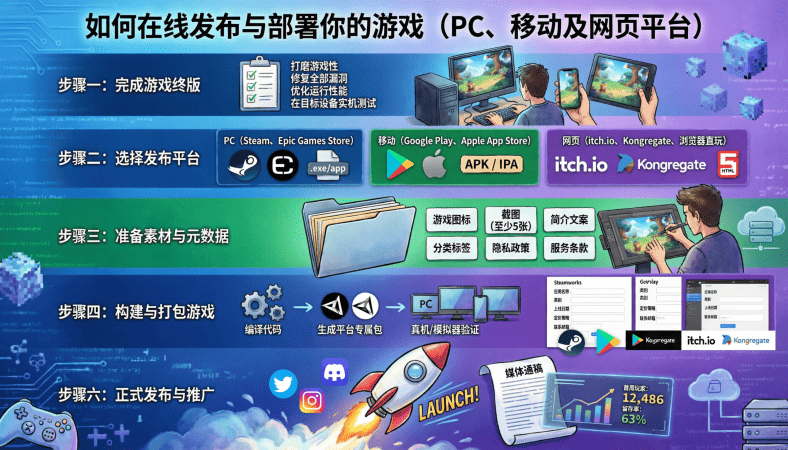
So, you’ve built your game. You’ve tested it. Maybe you’ve even deployed a multiplayer server. Now comes one of the most exciting parts: getting your game into players’ hands
I still remember the thrill of publishing my first game online. Seeing someone download and play something I made from scratch is a feeling you don’t forget.
Publishing isn’t just about uploading a file. You have to prepare your game properly, consider platforms, optimize builds, and make the process smooth for players. In this guide, we’ll walk through publishing for PC, mobile, and web, while keeping beginner developers in mind.
Step 1: Prepare Your Game for Deployment
Before you publish, make sure your game is ready:
-
Final Build Testing – Test on multiple devices to catch crashes or performance issues.
-
Polish Gameplay – Ensure menus, HUDs, and controls are responsive and intuitive.
-
Optimize Assets – Reduce large textures, audio files, and unnecessary objects to improve performance.
-
Include Dependencies – Make sure any libraries or runtime environments are included or documented.
Remember, a polished game keeps players coming back. Bugs on release can kill your launch momentum.
Step 2: Export Builds from Your Engine
Different engines provide options to export your game to multiple platforms:
Unity
-
PC: Windows, macOS, Linux
-
Mobile: Android (APK), iOS (IPA)
-
Web: WebGL
Steps:
-
Go to File → Build Settings
-
Select target platform
-
Configure resolution, graphics, and quality
-
Click Build
Unreal Engine
-
Uses Package Project for Windows, Mac, Android, iOS
-
Web builds are possible with HTML5 export (experimental in recent versions)
Godot
-
Export templates are needed for each platform
-
Supports Windows, macOS, Linux, Android, Web (HTML5)
Tip: Test each build on its native platform before distribution. Web builds may need server hosting. Mobile builds need device provisioning (especially iOS).
Step 3: Choose a Distribution Platform
Where your game is published depends on your target audience.
PC
-
Steam: Largest PC audience, revenue share applies, requires review and submission
-
itch.io: Indie-friendly, flexible pricing, direct uploads
-
Direct Download: Host files on your website or a server
Mobile
-
Google Play Store: Android, requires developer account, APK submission, review
-
Apple App Store: iOS, requires developer account, strict review process, provisioning profiles
Web
-
Web Hosting: Upload HTML5/WebGL build to your server or platform
-
itch.io Web Uploads: Great for small indie games
-
Game Jolt / Kongregate: Indie-friendly platforms
Each platform has requirements and restrictions, so read their guidelines carefully.
Step 4: Connect Your Game to Online Servers
If your game is multiplayer:
-
Make sure the client build points to your live server IP or domain
-
Test multiple clients connecting from different networks
-
Handle connection errors gracefully (e.g., server down, player timeout)
This ensures players can start playing immediately without frustration.
Step 5: Optimize for Each Platform
Different platforms have different performance constraints:
-
PC: Can handle higher graphics, but optimize for multiple GPU/CPU types
-
Mobile: Limited memory and battery, optimize textures and logic
-
Web: Browser-based, optimize for low bandwidth and smaller asset sizes
Optimization reduces crashes, lag, and negative reviews.
Step 6: Security and Anti-Cheating Measures
Even small games need security:
-
Validate all critical gameplay actions on the server
-
Encrypt sensitive data if storing accounts or transactions
-
Rate-limit actions to prevent abuse
-
For mobile, obfuscate code and protect assets where possible
Security ensures players trust your game.
Step 7: Marketing and Launch Preparation
Publishing is not enough. You need visibility:
-
Create screenshots, trailers, and gameplay videos
-
Write an engaging description with keywords
-
Share on social media and community forums
-
Offer demos or beta tests to generate feedback
Even a simple launch plan can make a huge difference in player uptake.
Step 8: Post-Launch Updates and Maintenance
Publishing is just the beginning:
-
Monitor server performance if multiplayer
-
Fix bugs and push updates regularly
-
Respond to player feedback
-
Add new content to retain interest
Active post-launch support builds trust and community around your game.
Summary: Platform-Specific Checklist
| Platform | Build Format | Distribution | Special Notes |
|---|---|---|---|
| PC | EXE / DMG / AppImage | Steam, itch.io, Direct | Test on multiple OS versions |
| Mobile Android | APK | Google Play | Test device compatibility |
| Mobile iOS | IPA | App Store | Provisioning profile required |
| Web | HTML5 / WebGL | Your server, itch.io | Optimize for browsers and bandwidth |
Final Thoughts
Publishing and deploying your game online is the moment all your hard work pays off. It’s exciting, stressful, and rewarding all at once.
A polished, optimized, and properly deployed game ensures:
-
Players can download or access it easily
-
Multiplayer features work reliably
-
Cross-platform reach maximizes audience
-
You maintain control over updates and scaling
If you follow these steps carefully, even a beginner can go from a local prototype to a live, playable game across multiple platforms.
Remember:
The first player to connect, play, and enjoy your game is a milestone you’ll never forget.
A Beginner’s Guide to Game Development: From Coding Your Game to Deploying It on an Online Server
Dreo Humidifiers for Bedroom
Dreo Humidifiers for Bedroom, 4L Top Fill for Large Room, 36H Runtime, 28 dB Quiet Supersized Cool Mist Air Humidifier for Baby Nursery, Plants, Indoor, Night Light, Easy to Clean & Fill, Black

MMO Mug
MMO Mug - Legendary Coffee Mug Level 110 - Large Ceramic Black15oz - Gaming, Gamer Cup

Panvola
Panvola Debugging Definition Computer Programmer Student Teacher Geek Coder Tech Support Programming IT Insulated Coffee Mug with Handle and Lid Camping Travel Thermal Mugs 14 oz Black

STGAubron Gaming PC Desktop
STGAubron Gaming PC Desktop Computer, Intel Core i5 up to 3.6G, Radeon RX 590 8G, 16GB RAM, 1TB SSD, 600M WiFi, BT 5.0, RGB Fan x3, Windows 11 Home

Scotch Thermal Laminating Pouches
Scotch Thermal Laminating Pouches, for Use with Thermal Laminators, 8.9 x 11.4 Inches, Letter Size Sheets, 100-Pack