
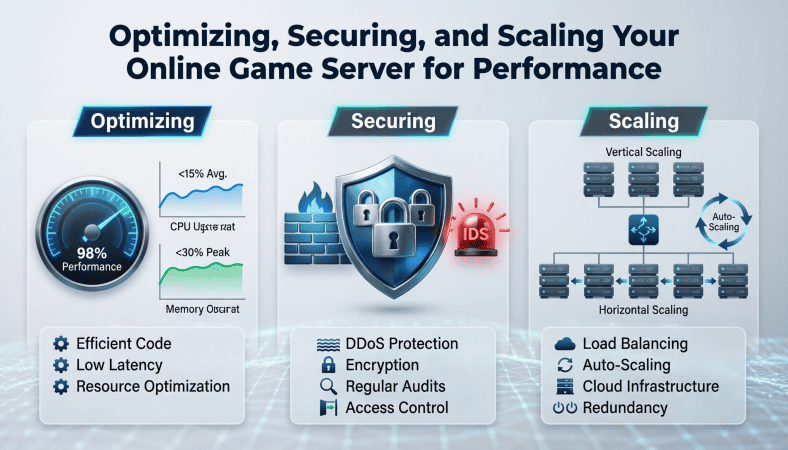
Building and deploying a game server is an achievement, but launching it is only the beginning. Once real players start connecting, performance issues, security vulnerabilities, and scaling challenges quickly become the top concerns.
I remember watching my first small multiplayer game crash under just a few dozen players. I realized then that hosting a server isn’t just about code it’s about infrastructure, optimization, and planning for growth.
In this guide, we’ll cover everything a beginner developer needs to know about optimizing, securing, and scaling online game servers, from indie-friendly VPS hosting to advanced performance techniques.
Why Optimization Matters
A slow, laggy, or unresponsive server kills the player experience. Even small delays can make competitive or cooperative games frustrating. Optimization ensures:
-
Smooth gameplay
-
Stable frame rates
-
Reduced bandwidth costs
-
Lower server resource usage
A well-optimized server also reduces hosting costs critical for indie developers on a budget.
Step 1: Optimize Your Game Server
Minimize Resource-Intensive Loops
Many beginners make the mistake of running heavy computations every frame. Instead:
-
Move calculations to intervals if possible (e.g., every 100ms instead of 60 times per second)
-
Cache frequently used values instead of recalculating
Efficient Data Transmission
Multiplayer servers send and receive data constantly. Reduce network load by:
-
Sending only necessary updates
-
Using delta updates (only what changed)
-
Compressing data if possible
Example: Instead of sending full player state each frame, send just position changes.
Object Pooling
Repeatedly creating and destroying objects (like bullets or enemies) can cause memory spikes. Use object pooling:
-
Reuse objects instead of destroying them
-
Reduces CPU and memory usage
-
Prevents lag spikes
Use Asynchronous Tasks
For database access or heavy computation:
-
Avoid blocking main server loop
-
Use async calls or separate threads
-
Keeps game logic running smoothly
Step 2: Secure Your Server
Security is critical, even for small indie projects.
Validate Client Inputs
Never trust the client:
-
Check movement, health, and actions server-side
-
Prevent speed hacks, teleportation, or cheating
-
Implement server-side authority for all game-critical events
Implement Rate-Limiting
-
Limit the number of requests per second per player
-
Prevent flooding attacks or spam actions
Protect Data
-
Encrypt sensitive data (player accounts, transactions)
-
Use secure connections (TLS/SSL) if transmitting personal info
Keep Software Updated
-
Regularly update your OS, server software, and game server framework
-
Security patches prevent exploits
Step 3: Monitor Server Performance
Monitoring is essential to prevent crashes and identify bottlenecks.
Key Metrics
-
CPU Usage – ensures your server can handle multiple players
-
RAM Usage – prevents memory leaks
-
Network Bandwidth – avoids packet loss or lag
-
Database Performance – queries should be fast
Tools like htop, Netdata, or cloud provider dashboards help track metrics in real-time.
Step 4: Scaling Your Server
Once you have more players, a single server may no longer suffice.
Horizontal Scaling
-
Add additional server instances
-
Use load balancing to distribute players
-
Each server handles a subset of players or game regions
Vertical Scaling
-
Upgrade server resources (RAM, CPU, network)
-
Easier for small games, but has limits
Separate Services
-
Split game logic, chat, and database servers
-
Reduces bottlenecks and improves stability
Step 5: Backup and Redundancy
Even small servers can fail unexpectedly.
-
Regularly back up server files and databases
-
Consider multiple VPS instances for redundancy
-
Use automated scripts for quick recovery
Redundancy ensures that player progress and data aren’t lost.
Step 6: Optimize for Low Latency
Latency is one of the biggest challenges in online multiplayer:
-
Place servers close to players geographically
-
Use UDP for real-time updates (faster than TCP)
-
Predict player movements for smoother gameplay (client-side prediction)
-
Interpolate positions to hide network delay
Even small improvements can drastically improve player experience.
Step 7: Plan for Future Growth
-
Keep architecture modular to add features without downtime
-
Prepare server instances for future expansions or new game modes
-
Monitor player counts to anticipate scaling needs
A server that works today may fail tomorrow if unprepared for growth.
Beginner-Friendly Hosting Tip
For indie developers:
-
High-end Cloud VPS hosting for a fair price. Featuring powerful AMD CPUs, plenty of RAM (starting from 8 GB), NVMe storage, and unlimited traffic, with full root access. Spin up your VPS in minutes!
-
Choose plans with high RAM and reliable bandwidth
-
VPS provides root access for installing dependencies, configuring firewalls, and monitoring performance
You can upgrade or scale as your player base grows without starting over.
Summary Checklist for Optimizing, Securing, and Scaling
| Step | Key Actions |
|---|---|
| Optimize | Efficient loops, object pooling, async tasks, delta updates |
| Secure | Validate inputs, rate-limiting, encrypt data, update software |
| Monitor | Track CPU, RAM, bandwidth, database performance |
| Scale | Horizontal/vertical scaling, separate services, load balancing |
| Backup | Regular backups, redundancy, quick recovery |
| Latency | Server proximity, UDP, prediction, interpolation |
| Growth | Modular architecture, plan for future expansions |
Final Thoughts
Launching your game server is only the beginning. Real success comes from maintaining smooth performance, securing the system, and scaling responsibly.
Even a small VPS hosting a few dozen players can become a polished, professional experience if managed correctly.
By focusing on:
-
Optimization
-
Security
-
Monitoring and scaling
-
you ensure your players have a reliable and enjoyable experience, which is what keeps them coming back.
Once you’ve mastered these steps, your indie game can truly go global — playable online, secure, and scalable, without requiring a huge team or budget.
A Beginner’s Guide to Game Development: From Coding Your Game to Deploying It on an Online Server

Blink Video Doorbell
Blink Video Doorbell (newest model) – Head-to-toe HD view, two-year battery life, and simple setup. Required Sync Module not included – Add-On (Black)

Panvola
Panvola Debugging Definition Computer Programmer Gifts Student Teacher Coder Boyfriend Girlfriend IT Vacuum Insulated Tumbler Tech Support Travel Mug Stainless Steel With Straw Removable Lid (30 oz)

Razer
Razer Basilisk V3 Pro 35K Wireless Gaming Mouse: HyperScroll Tilt Wheel - 35K DPI Optical Sensor Gen 2-13 Customizable Controls - Chroma RGB - Optical Switches Gen 3 - Up to 140 Hr Battery - Black

Canon PG-275
Canon PG-275 / CL-276 Genuine Ink Value Pack (2 Cartridges), Compatible with TS3520/3522/4722/3720/3722, TR4720

UGREEN USB-C Bluetooth Adapter for PS5
UGREEN USB-C Bluetooth Adapter for PS5, Bluetooth 5.3 Audio Adapter with APTX Low Latency & aptX-Adaptive, Wireless Audio Transmitter to Connect Wireless Headphones & Earbuds